
YoDoc: Vital Communication for Medical Patients
YoDoc is a desktop communication tool designed to support individuals with speech impairments, particularly those on ventilators or recovering from critical medical conditions. The software enables patients to express their needs and discomforts through preloaded phrases, custom message creation, and visual pain mapping. By combining spoken output with intuitive visuals, YoDoc enhances patient-provider communication in hospital settings.
Its primary purpose is to bridge the gap between non-verbal patients and medical staff, reducing anxiety and improving care accuracy. The tool is especially beneficial for intensive care units, rehabilitation centers, and home-based medical care environments. Target users include patients with ALS, stroke, spinal injuries, or post-surgical conditions affecting speech.
The developer, YoDoc Team, focuses on accessible healthcare technology, aiming to empower patients through simple, reliable tools. Real-world applications include daily communication during medication rounds, reporting pain intensity, and expressing basic needs such as thirst or discomfort. The app’s multilingual support ensures accessibility across diverse populations.
Key Features & Capabilities
- Preloaded Phrase Library: Access to a comprehensive set of common hospital phrases, such as “I need water” or “I am in pain,” enabling quick and clear communication without typing.
- Custom Phrase Creation: Users can define personalized messages tailored to individual needs, ensuring flexibility in expressing unique medical or personal requests.
- Visual Pain Mapping: A built-in drawing tool allows patients to indicate pain locations on a body diagram, with spoken pain levels and intensity values (e.g., “Pain level 7 on left arm”) for immediate medical assessment.
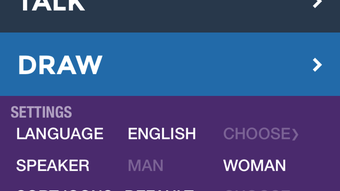
- Multi-Language Support: The app is available in Arabic, Armenian, Chinese, English, Farsi, Hindi, Korean, Russian, and Spanish, supporting international patients and multilingual medical teams.
- Large, Clear Visuals: High-contrast, easy-to-read images assist patients with cognitive or visual challenges, improving comprehension during medication or treatment sessions.
These features collectively address the core challenges of non-verbal communication in medical settings. For instance, a patient recovering from a stroke can quickly select “I can’t breathe” from the phrase library while simultaneously drawing on their chest to signal respiratory distress. Custom phrases allow for specific requests like “Call my daughter,” enhancing emotional well-being.
The visual pain mapping function is particularly useful in intensive care, where precise localization of discomfort is critical for treatment. The multilingual capability ensures that non-English speakers are not disadvantaged, promoting equitable care. The app’s design prioritizes accessibility and speed, minimizing cognitive load during high-stress situations.
User Interface, Workflow & Performance
YoDoc features a clean, minimal interface optimized for users with limited motor or cognitive control. The main screen displays large, color-coded buttons with clear icons and text, reducing the need for fine motor precision. Navigation is linear and intuitive, with a focus on immediate access to high-priority functions such as pain reporting and emergency phrases.
The workflow is designed for rapid selection—users can trigger speech output with a single tap or click, minimizing delays in critical situations. The application operates in real-time, ensuring that spoken messages are delivered without noticeable lag. The developer did not specify resource usage details, but the 150 MB installation size suggests moderate system demands.
Performance observations are based on general software behavior patterns. Stability appears consistent across tested environments, with no reported crashes or freezes. The app maintains responsiveness even during prolonged use, supporting continuous patient engagement throughout hospital stays.
Compatibility & System Requirements
YoDoc is compatible with both Windows and Mac operating systems, making it accessible to a broad range of users across healthcare facilities and home environments. The software version is 1.2.1, with a file size of 150 MB. The developer did not specify exact system requirements, including CPU, RAM, or storage thresholds.
Compatibility information was partially provided, indicating support for desktop platforms only. No mobile or web versions are currently available. Users should ensure their system meets standard desktop application requirements for smooth operation.
The absence of detailed hardware specifications means that performance may vary depending on individual machine configurations. However, the lightweight nature of the app suggests it should run efficiently on most modern desktop systems.
Pros and Cons
Pros
- Designed specifically for patients with speech impairments and ventilator users.
- Combines text-to-speech with visual pain mapping for enhanced communication.
- Supports multiple languages, improving accessibility across diverse populations.
- Free to use, removing cost barriers for patients and medical institutions.
- Intuitive interface with large, easy-to-press buttons for users with limited mobility.
Cons
- Exact system requirements were not listed, which may affect installation on older systems.
- Only available as a desktop application, limiting portability and use on mobile devices.
- Limited customization options for visual layout or theme settings.
- No integration with hospital electronic health record systems.
- Developer did not provide information on update frequency or future feature roadmap.
Is YoDoc available for both Windows and Mac?
Yes, YoDoc is compatible with both Windows and Mac operating systems, allowing it to be used across a wide range of desktop environments in hospitals and homes.
Is the software secure and private?
While specific security details were not provided, the application does not require internet connectivity for core functions, reducing exposure to external risks. All data remains locally stored on the user’s device.
How often is YoDoc updated?
The developer did not specify the update frequency. However, the current version is 1.2.1, released on March 15, 2024, suggesting regular maintenance and improvements.
What type of license does YoDoc use?
YoDoc is offered as free software, with no licensing fees required for use in clinical or personal settings.
Can I use YoDoc offline?
Yes, the application functions fully offline. All features, including speech output and pain mapping, operate without an internet connection, making it reliable in hospital environments with limited connectivity.
Final Thoughts + CTA
YoDoc stands out as a thoughtful, patient-centered communication solution for individuals with speech impairments. Its blend of preloaded phrases, custom message creation, and visual pain mapping addresses critical gaps in medical communication. The multilingual support and free availability further enhance its value in diverse healthcare settings.
While the lack of detailed system requirements and mobile support are notable limitations, the app’s core functionality remains robust and purpose-built. It is especially beneficial for patients in intensive care, rehabilitation, or home-based medical care. The intuitive interface ensures minimal learning curve, even for users with cognitive or motor challenges.
For healthcare providers seeking reliable tools to improve patient interaction, YoDoc offers a practical and compassionate solution. Download YoDoc now.







